Baibhav Pattnayak
Connect Local
ConnectLocal is the ultimate social networking app designed to help you forge meaningful connections with people who share your interests, all while taking advantage of your geographical proximity. Whether you're new to a city, looking to expand your social circle, or simply want to meet like-minded individuals, ConnectLocal makes it easy and fun.


ConnectLocal is the ultimate social networking app designed to help you forge meaningful connections with people who share your interests, all while taking advantage of your geographical proximity. Whether you're new to a city, looking to expand your social circle, or simply want to meet like-minded individuals, ConnectLocal makes it easy and fun.

In our digital age, people find it challenging to form local, interest-based connections, missing out on genuine friendships and community engagement. Existing social platforms lack effective solutions. ConnectLocal seeks to bridge this gap, fostering authentic relationships and vibrant local communities through its unique combination of location-based matching and robust communication features.

As a UX designer, my role is to ensure ConnectLocal's design is user-centric and intuitive. i simplify the experience through research, logical navigation, and appealing aesthetics, leading to higher user satisfaction and engagement. my work impacts how users interact with the app, making it easy and enjoyable to use.

The primary research highlighted a strong demand for ConnectLocal's concept of facilitating genuine local connections based on shared interests while prioritizing user privacy and safety. The combination of interviews, surveys, and market analysis provided valuable insights into user preferences, pain points, and market trends, shaping the app's development and design decisions.

A field study observed users interacting with ConnectLocal, exploring features like profile creation, location-based matching, messaging, and event discovery. Interviews provided insights on usability, social relevance, and overall satisfaction, guiding improvements for interface refinement and enhanced user experience.
Research & Analysis
-
User Interviews:
Interviews with potential users highlighted a desire for meaningful connections based on shared interests and proximity, frustration with dating-focused apps, and a preference for a user-friendly interface with privacy controls. -
Questioniare Survey
Surveys gathered data showing high interest in local connections, concerns about safety, and demand for features like location-based matching and group activities. -
Market analysis
Market analysis revealed a market dominated by dating apps, varied approaches to location-based features, and identified gaps for a user-centric friendship platform.
85% of respondents expressed a high interest in connecting with like-minded individuals locally.
72% mentioned that they find it challenging to make new friends in their current social circles.
78% of users stated that safety and privacy features are crucial when using social networking apps.
64% reported concerns about sharing personal information on traditional social platforms

User Personas
Introverted, tech-savvy, and prefers small group gatherings
Personality:
Video gaming, coding, and science fiction.
Interest:
-
Blogs
-
Reviews and ratings on apps and websites.
-
Movies
Influences:
Challenges:
Finds it difficult to meet people with similar interests in his neighborhood due to a busy work schedule.
Goals:
Wants to expand his social circle with like-minded individuals, find friends for gaming, and attend local tech meetups.

Age: 27
Occupation:
Software Developer
Location: Urban Area
Alex (Male)


Information Architecture

-
Sign Up / Log In
-
User opens the app and either signs up with their email or logs in if they already have an account.
-
-
Profile Creation
-
New users are prompted to create their profile by adding personal information, interests, hobbies, and privacy settings.
-
-
Home Screen
-
Upon logging in, users land on the home screen displaying featured matches, nearby events, and quick access to chat/call options.
-
-
Search and Discover
-
Users navigate to the search and discover section to find connections based on location, interests, or recommended matches.
-
-
Connecting with Matches
-
Users view potential matches and can initiate conversations through chat or video calls based on mutual interests.
-
-
Messaging and Calls
-
Once connected, users engage in individual or group chats, share media, and schedule video or voice calls for more personalized interactions.
-
-
Exploring Events
-
Users explore local events and meetups related to their interests, view event details, and RSVP to attend.
-
-
Managing Connections
-
Users can manage their connections by adding friends, joining groups or communities, and organizing meetups or events.
-
-
Settings and Preferences
-
Users access account settings to customize notification preferences, update profile information, and seek help or support if needed.
-
Main Flow
.png)
.png)
%201.png)
Wireframe

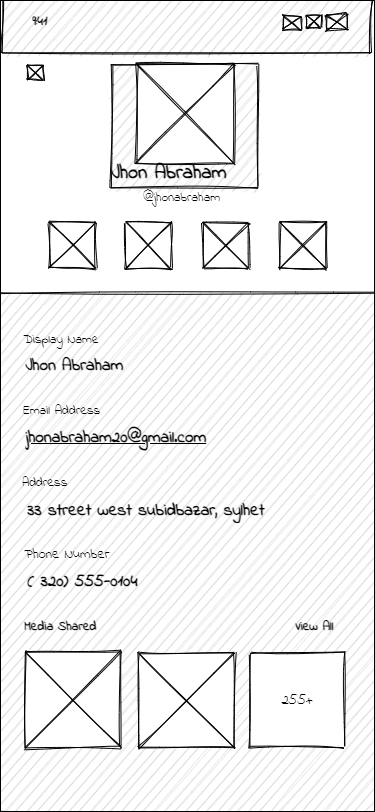
Interest-Based Profiles
Customize your profile to showcase your hobbies, interests, and personality. This helps others get to know you and allows for more accurate matchmaking.


Explore More Projects

Baibhav Pattnayak
© 2024 Baibhav pattnayak portfolio
Tel- +91 7750042025
Mail- baibhavpattnayak@gmail.com
Banglore , India ,560068